Sketch Text Effect Graffiti Style: A Creative Designer’s Best Friend
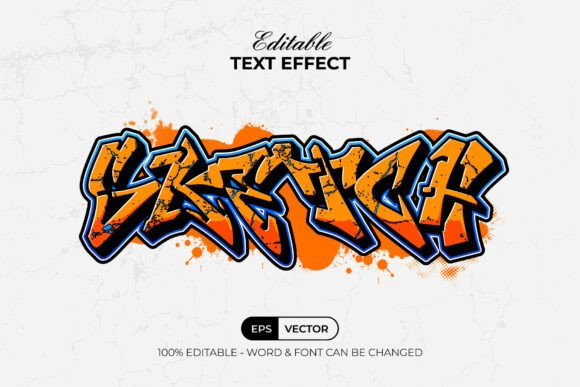
If you're looking to inject a bold, urban vibe into your design projects, the Sketch Text Effect Graffiti Style might just be the tool you've been waiting for. This Adobe Illustrator graphic style set transforms ordinary text into eye-catching, hand-drawn graffiti-style lettering with just a few clicks. It's not a font, but rather a ready-to-use effect that lives in Illustrator's Graphic Styles menu—making it easy to apply and customize without any steep learning curve.
What Makes Sketch Text Effect Graffiti Style Unique?
Unlike traditional fonts or static design assets, the Sketch Text Effect Graffiti Style gives designers the flexibility to maintain a handcrafted aesthetic while working within a fully editable vector environment. Each text effect is built using layers that are well-organized, allowing you to tweak stroke widths, colors, and textures to match your vision. The package includes 100 editable text and font variations, all set in RGB color mode and using free fonts that are easy to download and install.
Because it's a graphic style rather than a fixed font, you can apply it to any text or custom shape you create in Illustrator. Whether you're designing a poster, logo, or social media graphic, this effect helps you maintain a consistent, edgy look across all your assets.
Real-World Uses for Graffiti-Style Text Effects
One of the biggest strengths of the Sketch Text Effect Graffiti Style is its versatility. Here are a few real-world scenarios where this tool can make a big difference:
- Streetwear Branding: Streetwear brands thrive on bold, expressive visuals. Designers can use this effect to create impactful logos, packaging, and apparel tags that resonate with a younger, urban audience.
- Music & Festival Posters: From concert flyers to festival banners, graffiti-style text can help capture the energy and spontaneity of live events. It works especially well for genres like hip-hop, punk, and electronic music.
- Urban-Inspired Social Media Content: Platforms like Instagram and TikTok favor visually striking content. The Sketch Text Effect Graffiti Style makes it easy to design standout captions, quotes, and promotional graphics that fit the aesthetic of urban influencers and creators.
- Advertising for Youth-Centric Products: Whether you're promoting sneakers, skateboards, or street art supplies, this effect helps align your visuals with the energetic and rebellious tone of your target audience.
Who Can Benefit from Using This Effect?
This tool isn't just for graphic designers—it's also incredibly useful for marketers, illustrators, and content creators who want to elevate their visual output without investing hours into learning complex design techniques.
- Freelance Designers: If you're working on tight deadlines, being able to apply a high-quality, editable graffiti effect in seconds can save you hours of manual drawing and layering.
- Small Business Owners: Entrepreneurs launching urban-themed brands can use this effect to create professional-looking designs without hiring a full-time designer.
- Students & Hobbyists: For those learning Adobe Illustrator, this tool serves as a great example of how graphic styles work and how they can be manipulated to create different visual outcomes.
How to Use Sketch Text Effect Graffiti Style Like a Pro
Getting started with the Sketch Text Effect Graffiti Style is straightforward. The package includes an AI file and an EPS file that you can open directly in Adobe Illustrator CC or later versions. Once loaded, simply type or shape your text and apply the desired graphic style from the Graphic Styles panel.
Here are a few tips to get the most out of it:
- Experiment with Colors: While the default color palette is set in RGB, don't be afraid to tweak hues and gradients to match your brand or mood.
- Layer with Backgrounds: Pair your graffiti text with gritty textures or urban backdrops to enhance the overall aesthetic.
- Customize Strokes: Adjust stroke widths and textures manually to create variations that feel more hand-drawn and organic.
- Combine with Other Styles: Layer this effect with other Illustrator graphic styles or effects to create truly unique compositions.
Things to Consider Before Using Graffiti-Style Effects
While the Sketch Text Effect Graffiti Style is powerful and flexible, it may not be suitable for every project. Here are a few considerations to keep in mind:
- Brand Tone: Graffiti-style text is inherently bold and informal. If your brand voice is more professional or corporate, this style might clash with your overall messaging.
- Readability: Some graffiti designs can be difficult to read at smaller sizes. Always test your text in different contexts to ensure it remains legible.
- Target Audience: While this style resonates with younger, urban audiences, it may not connect with older or more conservative demographics.
- File Compatibility: Make sure you're using Adobe Illustrator CC or above to ensure compatibility. If you're collaborating with others, confirm they have the same version or provide the necessary fonts and assets.
Final Thoughts
The Sketch Text Effect Graffiti Style is more than just a design asset—it's a creative shortcut that empowers designers and non-designers alike to produce high-quality, expressive visuals with minimal effort. Whether you're crafting a logo for a new streetwear line or designing a social media post for a music event, this tool can help you achieve that authentic, hand-drawn graffiti look without the hassle of drawing each letter by hand.
With its easy-to-edit format, layered structure, and wide range of use cases, it's no wonder this effect has become a go-to for designers who want to add an urban edge to their work. Just remember to consider your audience, brand tone, and readability before diving in—and don’t be afraid to experiment with colors and textures to make it truly your own.