Project Proposal Google Slides Template Guide
Securing approval for a new initiative often depends as much on presentation as it does on the underlying idea. A well-structured narrative can clarify complex logistics, while a disjointed deck can obscure even the most brilliant strategy. The Project Proposal Google Slides Template addresses this critical gap by providing a professional framework designed specifically for pitching work. Rather than starting with a blank canvas, professionals can leverage a contemporary design system that balances aesthetic appeal with functional clarity. This template serves as more than just a visual skin; it acts as a structural guide to help you organize thoughts, present data effectively, and maintain brand consistency throughout your pitch.
Elevating Professional Communication Through Design
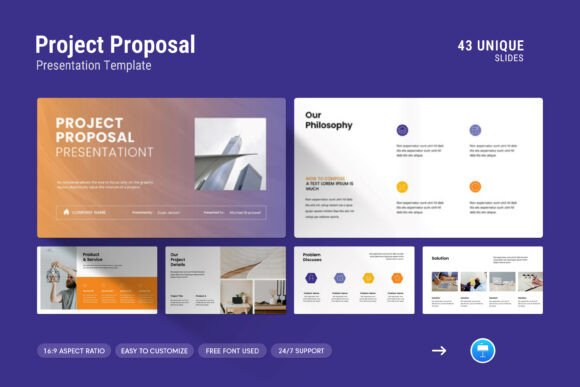
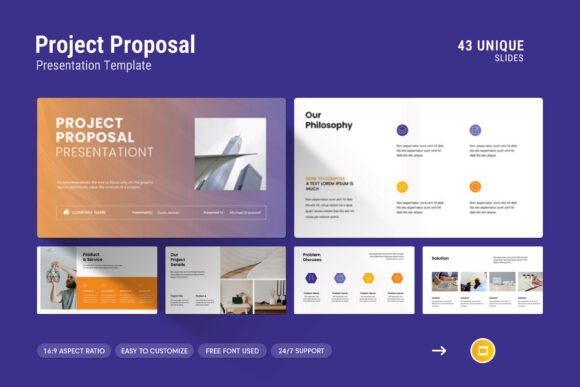
First impressions in a business setting are frequently visual. When stakeholders open a presentation, the layout immediately signals the level of care and professionalism invested in the proposal. This template utilizes a clean, modern aesthetic that avoids clutter, ensuring that your content remains the focal point. The inclusion of creative photo layouts allows teams to showcase past work or project mockups without resorting to generic stock imagery placements. For agencies and freelancers, this distinction is vital. It transforms a standard document into a portfolio-quality presentation that reinforces your company profile.
The design philosophy here focuses on readability and hierarchy. With 48 unique slides, users are not forced to repeat the same layout, which keeps the audience engaged. However, the consistency in typography and spacing ensures the deck feels cohesive rather than chaotic. This balance is particularly useful for entrepreneurs and marketers who need to convey innovation without sacrificing corporate credibility. By using pre-designed master slide layouts, you ensure that every header, footer, and content block aligns perfectly, eliminating the subtle misalignments that can subconsciously undermine trust during a high-stakes meeting.
Streamlining Workflow with Editable Master Slides
Time is often the scarcest resource when preparing a proposal. The technical architecture of this Project Proposal Google Slides Template is built to accelerate production without requiring advanced graphic design skills. The master slide functionality allows for global changes across multiple slides simultaneously. If your brand guidelines require a specific shade of blue or a updated logo placement, you can adjust the master layout once, and the change propagates instantly. This feature alone can save hours of manual formatting, allowing you to focus on refining your argument and verifying your data.
Furthermore, the drag-and-drop picture placeholders simplify the process of customizing visuals. Instead of cropping and resizing images manually to fit arbitrary shapes, users can simply drop their assets into designated frames. This ensures that all visuals maintain a consistent aspect ratio and style, preserving the integrity of the original design. For small business owners and educators who may not have dedicated design support, this efficiency is transformative. It democratizes high-end presentation design, making it accessible to anyone who needs to communicate ideas effectively under tight deadlines.
Data Visualization and Infographic Integration
Proposals frequently rely on data to justify budgets, timelines, and expected outcomes. Text-heavy slides often fail to communicate these metrics effectively. This template includes specialized infographics, tables, and diagrams designed to make complex information digestible. Whether you are presenting a Gantt chart for project management or a financial breakdown for investors, having pre-formatted data visualization tools ensures your numbers look as professional as your prose.
These elements are fully editable vectors, meaning they scale without losing quality and can be recolored to match your specific branding. This is crucial for maintaining visual continuity. For example, if your proposal involves three distinct phases, you can use the included diagram slides to map out the workflow visually. This aids comprehension significantly compared to bullet points. Marketers and consultants will find these features particularly valuable when trying to simplify abstract concepts or demonstrate ROI to non-technical stakeholders. The ability to visualize the "how" and "why" alongside the "what" strengthens the persuasive power of the proposal.
Cross-Platform Compatibility and Technical Flexibility
In today’s hybrid work environment, teams rarely operate on a single operating system. A significant practical advantage of this template is its dual compatibility with both Apple and Windows environments via Google Slides and PowerPoint (.PPTX) formats. This versatility eliminates the friction that often occurs when files are shared between Mac and PC users. Formatting issues, missing fonts, and broken layouts are common pain points in cross-platform collaboration, but this template mitigates those risks through standardized formatting and free font usage.
The decision to utilize free fonts is a strategic one. Proprietary fonts can cause rendering errors if the recipient does not have them installed. By relying on universally available typefaces, the template ensures that your presentation looks identical on your screen, your colleague's laptop, and the client's projector. Additionally, the 16:9 Full HD ratio (1920x1080px) is optimized for modern displays and video conferencing tools. As remote presentations become standard, ensuring your slides fill the screen correctly without black bars or pixelation is a necessary detail for maintaining engagement during virtual meetings.
Support and Customization Considerations
While templates offer immense value, they are tools that require proper utilization. The included help file and PDF support documentation provide essential guidance for maximizing the template's potential. However, users should approach customization with intention. Because the design is comprehensive, there is a temptation to use every feature available. Restraint is often more effective. Select only the slides that directly support your narrative arc. A 10-slide deck that tells a compelling story is superior to a 48-slide marathon that dilutes the core message.
It is also worth noting the availability of real support from skilled designers. This safety net is invaluable for users who encounter technical hurdles or need advice on adapting specific layouts. Unlike generic template marketplaces where support is automated or nonexistent, having access to human expertise ensures that technical issues do not derail your preparation timeline. This level of service adds a layer of reliability that is especially important for freelancers and small teams operating without internal IT departments.
Identifying the Right Fit for Your Needs
This Project Proposal Google Slides Template is ideally suited for professionals who need to bridge the gap between creative expression and business formality. Creative agencies, architects, and designers will appreciate the photo-centric layouts, while consultants and project managers will benefit from the structured data slides. Educators and trainers can repurpose the infographic elements for instructional content, making dense material more accessible to students.
However, it is important to assess whether this specific aesthetic aligns with your industry standards. While the contemporary design works well for tech, marketing, education, and creative sectors, highly regulated industries with strict compliance formatting requirements might need to adapt the template more heavily. Users should compare this option against their specific deliverable requirements. If your organization mandates a rigid, text-heavy legal format, this visually driven template might serve better as a supplementary pitch deck rather than the primary compliance document.
Ultimately, the value of this template lies in its ability to reduce cognitive load. By handling the design heavy lifting, it frees up mental energy for strategy and storytelling. For entrepreneurs launching a startup, marketers pitching a campaign, or freelancers bidding on a contract, the difference between a good idea and a funded project often comes down to communication quality. This tool provides the polished vessel necessary to carry your ideas across the finish line, ensuring that your hard work is presented with the clarity and impact it deserves. Investing time in selecting and mastering the right template is an investment in your professional reputation and the success rate of your future proposals.