Elevating Your Pitch with the Project Proposal PowerPoint Template
Securing approval for a new initiative often hinges less on the raw data and more on how effectively that data is communicated. The Project Proposal PowerPoint Template serves as a strategic communication tool designed to bridge the gap between complex project details and stakeholder understanding. Rather than forcing you to build a narrative structure from scratch, this template provides a contemporary, professional framework that allows you to focus entirely on refining your message. It is specifically engineered for professionals who need to present works, company profiles, or strategic plans with clarity and visual impact.
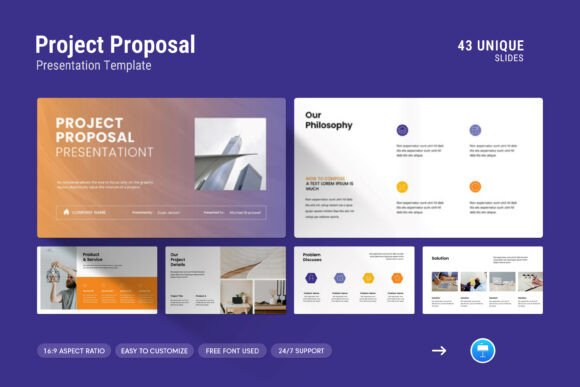
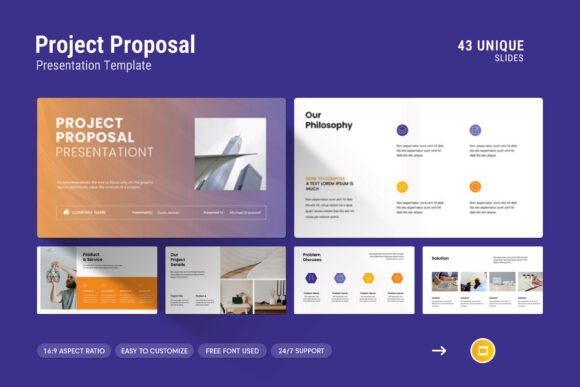
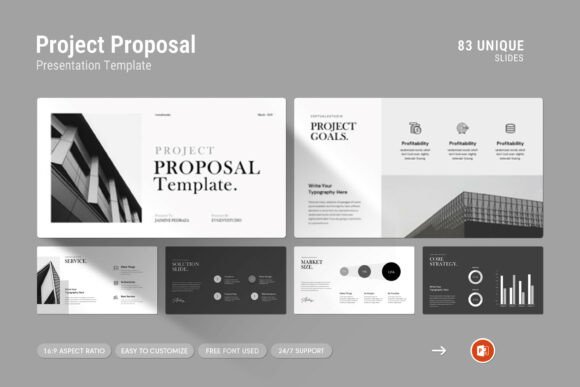
At its core, this resource is about reducing friction in the presentation creation process. With 83 slides included in the .PPTX file, it offers a comprehensive library of layouts ranging from creative photo arrangements to data-heavy infographics and tables. The design philosophy balances simplicity with power, ensuring that the aesthetic supports the content rather than distracting from it. Because it utilizes master slide layouts and free fonts, users can maintain brand consistency across dozens of slides without manual formatting adjustments. This level of preparation is essential when presenting to high-level decision-makers who expect polished, error-free documentation.
Real-World Applications Across Industries
The versatility of the Project Proposal PowerPoint Template becomes apparent when applied to specific professional scenarios. Different industries require different narrative flows, and having a diverse set of pre-designed slides allows for rapid customization based on the audience.
Consulting and Professional Services
For consultants pitching retainer agreements or scope-of-work expansions, trust is the primary currency. The template’s clean lines and vector icons help convey professionalism and organizational competence. When proposing a six-month digital transformation strategy, for example, you can utilize the diagram slides to map out phases and milestones visually. Instead of listing deliverables in bullet points, the infographic layouts allow you to show the relationship between current pain points and proposed solutions. This visual storytelling helps clients grasp the value proposition faster than text-heavy slides ever could.
Creative Agencies and Portfolios
Marketing teams and design agencies face the unique challenge of selling creativity through a structured format. The creative photo layouts included in this template are particularly valuable here. When presenting a rebranding proposal or a new campaign concept, the ability to drag and drop high-resolution imagery into professionally framed placeholders ensures your visual assets look their best. You can showcase mood boards, previous case studies, and team profiles without worrying about alignment or whitespace. The 16:9 Full HD ratio (1920x1080px) guarantees that your work looks crisp whether projected in a boardroom or shared via screen share during a remote pitch.
Corporate Internal Stakeholders
Internal proposals often suffer from "death by PowerPoint" because employees assume internal audiences will tolerate lower design standards. However, securing budget for a new software implementation or hiring plan requires the same level of persuasion as external sales. The table and chart layouts in this template are ideal for ROI projections, budget breakdowns, and resource allocation matrices. By using consistent color schemes and typography, you signal to leadership that the proposal has been thoroughly vetted and professionally prepared. The easy color change feature allows you to instantly align the deck with corporate branding guidelines, maintaining internal visual identity standards.
Startups and Investor Relations
When seeking seed funding or Series A investment, founders need to communicate vision, market size, and traction quickly. The sheer volume of slides (83 total) means you likely won't use them all, but having options allows you to select only the most impactful layouts for a pitch deck. The master slide functionality ensures that if you decide to pivot your color palette after receiving feedback from one investor group, the change propagates instantly across the entire deck. This agility is crucial in fundraising environments where iteration speed matters.
Practical Considerations Before Implementation
While the Project Proposal PowerPoint Template is designed for ease of use, maximizing its effectiveness requires some upfront consideration. Understanding the technical and strategic aspects of the file will prevent common pitfalls during the editing process.
Content Strategy Precedes Design Selection
A common mistake is browsing the 83 slides and selecting layouts based solely on aesthetics before defining the narrative arc. It is far more effective to outline your proposal’s key messages first, then select slides that support those specific points. If your proposal relies heavily on financial modeling, prioritize the data visualization slides over the creative photo layouts. The template is a container for your ideas, not the source of them. Having a clear outline prevents the temptation to include unnecessary slides simply because they look good, which can dilute your core message.
Technical Compatibility and Asset Management
The template works seamlessly on both Apple Keynote and Windows PowerPoint, but cross-platform editing can sometimes result in minor font rendering differences. Since the template uses free fonts, ensure you have installed the specified typefaces before beginning extensive editing to avoid layout shifts. Additionally, while the drag-and-drop picture replacement feature is intuitive, always prepare your images at the correct aspect ratio beforehand. Stretching or cropping images within PowerPoint can reduce quality; pre-sizing assets ensures the final output remains Full HD sharp.
Leveraging Support Resources
Many users overlook the included Help File and PDF support documentation, diving straight into editing. Taking ten minutes to review these resources can save hours of troubleshooting later. The documentation explains master slide relationships and color theme editing, which are critical for making global changes efficiently. Furthermore, the provider offers free real support from skilled designers. If you encounter a layout issue or need guidance on customizing a specific diagram, reaching out to support is a valid and recommended step. This human element transforms the product from a static file into a collaborative design resource.
Balancing Strengths and Limitations
No template is a universal solution, and understanding the boundaries of the Project Proposal PowerPoint Template helps set realistic expectations. Its primary strength lies in its breadth and editability. The combination of vector icons, diagrams, and master slides provides a robust toolkit for almost any business presentation need. The fact that it is fully editable means you are never locked into a rigid structure; you can delete elements, merge slides, or repurpose layouts as needed.
However, the limitation of such a comprehensive library is the potential for inconsistency if not managed carefully. Using too many different slide styles within a single presentation can make the deck feel disjointed. Users must exercise editorial discipline, selecting a cohesive subset of slides that share a similar visual rhythm. Additionally, while the template handles standard business graphics excellently, highly specialized technical diagrams (such as engineering schematics or complex code architecture) may still require custom creation outside of PowerPoint. The template accelerates the 80% of standard presentation needs, but niche requirements may still demand bespoke design work.
Ultimately, this template functions best as a productivity multiplier. It removes the blank page anxiety and provides a professional foundation, allowing you to invest your energy where it matters most: crafting a compelling argument for your project. Whether you are a freelancer pitching a client, a manager requesting headcount, or an entrepreneur seeking capital, the right visual framework can significantly influence how your proposal is received and remembered.