Business Google Slides Template: Professional Design
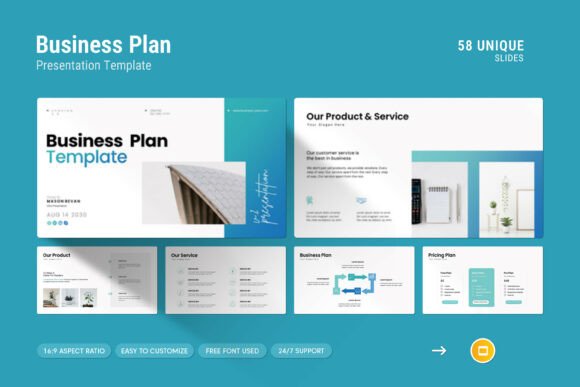
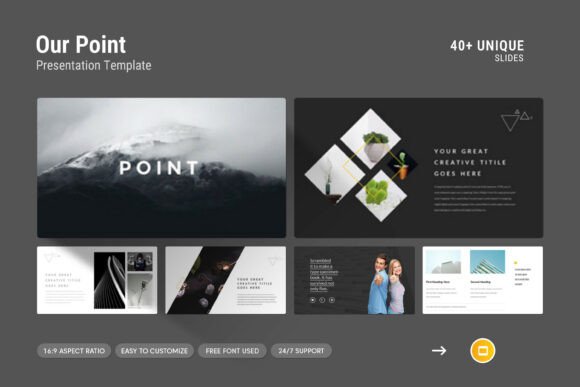
Presenting complex information requires more than just good data; it demands a visual structure that guides your audience through your narrative. A Business Google Slides Template serves as this foundational framework, offering a pre-designed ecosystem of layouts, infographics, and typography that transforms raw content into a compelling story. Rather than starting with a blank white canvas, users gain access to a contemporary yet powerful design system built specifically for professional communication. This particular template bridges the gap between aesthetic appeal and functional utility, providing 44 distinct slides that cater to various presentation needs, from company profiles to detailed analytical reports.
The value of such a resource shifts significantly depending on who is using it and what they aim to achieve. For a startup founder pitching to investors, the template’s clean lines and creative photo layouts signal maturity and attention to detail. For an educator, the included diagrams and tables offer a way to break down dense curriculum into digestible visual chunks. Understanding these varied applications helps determine if this specific tool aligns with your current project goals and technical comfort level.
Diverse Applications Across Professional Roles
Different professionals prioritize different aspects of a presentation asset. While a marketer might focus on brand consistency and visual impact, a project manager may care more about data visualization and timeline clarity. This Business Google Slides Template addresses these varying needs through its versatile master slide layouts.
Entrepreneurs and Small Business Owners
For business owners, time is often the scarcest resource. Creating a pitch deck or annual report from scratch can consume dozens of hours that would be better spent on operations or strategy. This template offers immediate commercial value by reducing design time without sacrificing quality. The inclusion of vector icons and pre-formatted tables allows entrepreneurs to present financial projections or service offerings professionally. Because the design is fully editable and uses free fonts, there are no hidden costs or licensing hurdles, making it a practical choice for bootstrapped ventures needing to look established.
Educators and Trainers
In educational settings, clarity trumps decoration. Instructors and corporate trainers benefit from the template’s infographic slides and diagram options, which help visualize abstract concepts. The 16:9 Full HD ratio (1920x1080px) ensures that content remains legible whether projected in a lecture hall or shared via screen during a remote workshop. Unlike highly stylized marketing decks, this template maintains a neutral, contemporary aesthetic that supports learning rather than distracting from it. The ability to drag and drop images also makes updating course materials semester after semester a straightforward process.
Creatives and Freelancers
Designers and creative professionals often face the paradox of spending so much time on client work that their own portfolios suffer. This template provides a structured gallery for showcasing work. The creative photo layouts allow creatives to display portfolios in a grid or masonry style that feels intentional rather than cluttered. For freelancers, maintaining a consistent personal brand across proposals and case studies is essential for commanding higher rates. Using a cohesive master layout ensures that every deliverable reinforces their professional identity.
Evaluating Technical Flexibility and Ease of Use
Beyond aesthetics, the practical utility of a Business Google Slides Template depends on how easily it adapts to unique content. Technical barriers can turn a helpful tool into a source of frustration, so understanding the editing capabilities is crucial before committing to a design.
- Cross-Platform Compatibility: The template works seamlessly on both Apple and Windows systems. This is vital for teams with mixed hardware environments or individuals who switch between devices. Whether you are editing in Google Slides via a browser or using the included .PPTX file in PowerPoint, the formatting remains stable.
- Master Slide Architecture: Changes made to master slides propagate throughout the deck. This feature is essential for rebranding or global adjustments. Instead of resizing logos or changing header colors on 44 individual slides, users can update the master layout once, ensuring perfect consistency.
- Color Customization: Brand alignment is non-negotiable for most professional presentations. The easy color change functionality allows users to swap the default palette for their specific brand hex codes instantly. This flexibility ensures the template feels bespoke rather than generic.
- Image Replacement: The drag-and-drop picture placeholders eliminate the need for manual cropping and resizing. Users simply drag their image into the frame, and the mask automatically adjusts. This preserves the intended composition of the slide while accommodating custom photography.
Prioritizing Quality and Long-Term Usefulness
When selecting a presentation asset, users must weigh immediate convenience against long-term reliability. A template that looks trendy today may appear dated in six months, whereas a simple, contemporary design tends to have greater longevity. This Business Google Slides Template leans toward timeless minimalism, avoiding excessive gradients or decorative elements that age poorly.
Reliability also extends to support and documentation. The inclusion of a help file and PDF support details indicates that the creator has anticipated user questions. Access to free real support from a skilled designer adds a layer of security, particularly for beginners who may encounter formatting issues. Knowing that expert assistance is available reduces the risk associated with adopting new tools.
Furthermore, the use of free fonts eliminates a common pain point in template usage. Many premium templates rely on paid typefaces, forcing users to either purchase licenses or spend hours replacing missing fonts. By utilizing freely available typography, this template ensures that the design renders correctly for every viewer and editor, regardless of their software subscription status.
Determining Fit for Your Specific Goals
Not every project requires a comprehensive 44-slide suite. Evaluating whether this Business Google Slides Template matches your needs involves honest assessment of your content volume and design requirements.
Choose this template if:
- You need a versatile foundation that covers multiple presentation types (reports, pitches, profiles).
- You require professional-grade infographics and data visualization but lack advanced design skills.
- You work in a collaborative environment where team members use different operating systems.
- You want to maintain brand consistency through master slides and global color controls.
- You prefer a clean, modern aesthetic that prioritizes content readability over decorative flair.
Consider alternatives if:
- Your presentation is purely photographic and requires full-bleed image layouts without text overlays.
- You need highly specialized industry-specific charts not covered by general business infographics.
- You are looking for animated transitions or video-heavy multimedia integration beyond standard embeds.
Ultimately, the effectiveness of any Business Google Slides Template lies in how well it serves the presenter's message. This resource excels at providing a polished, professional container for business communication. It removes the friction of design, allowing users to focus on refining their arguments, analyzing their data, and connecting with their audience. Whether you are a seasoned executive streamlining your reporting process or a student learning the fundamentals of visual communication, the right template acts as a force multiplier for your ideas.
By leveraging features like master layouts, vector icons, and responsive image placeholders, users can produce high-quality presentations with confidence. The combination of technical flexibility, cross-platform compatibility, and dedicated support makes this template a reliable asset for anyone seeking to elevate their professional profile. When the design infrastructure is solid, the presenter is free to do what matters most: deliver value to their audience.