Brand Guideline PowerPoint Template: Elevating Visual Identity Presentations
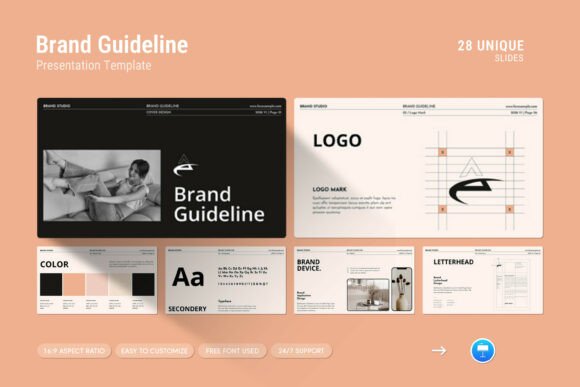
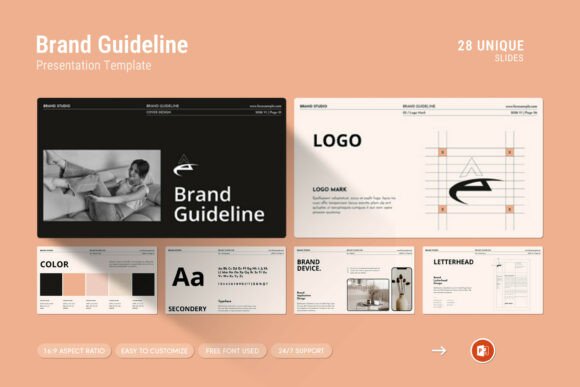
Creating a cohesive visual identity is one of the most critical tasks for any business, but communicating those standards to a team or client can often feel disjointed. A Brand Guideline PowerPoint Template serves as the essential bridge between abstract design concepts and practical application. Rather than handing over a dense PDF manual that few people read, this template transforms brand rules into an engaging, interactive presentation. It is a contemporary, powerful design system built specifically to showcase company profiles, logo usage, typography hierarchies, and color palettes in a format that stakeholders actually want to watch.
At its core, this resource is more than just a slide deck; it is a strategic communication tool. With 28 fully editable slides in a 16:9 Full HD ratio (1920x1080px), it provides a structured narrative for explaining why specific design choices were made. Whether you are a freelance designer delivering a final rebrand package or an internal marketing manager onboarding new hires, the template offers a professional canvas that does the heavy lifting regarding layout and structure. This allows you to focus entirely on the content and the story behind the brand rather than wrestling with alignment tools and master slides.
Real-World Scenarios for Brand Communication
The true value of a Brand Guideline PowerPoint Template emerges when applied to specific, high-stakes situations. Different industries and roles face unique challenges when standardizing their visual language, and this template adapts to meet those needs through versatile layouts including infographics, tables, and creative photo arrangements.
Agency Client Handoffs and Rebrand Launches
For creative agencies, the moment of delivering a new brand identity is pivotal. Clients often struggle to visualize how a logo or color scheme translates across different media. Using this template allows designers to present the guidelines as a polished, premium product. The drag-and-drop picture placeholders make it simple to insert mockups of business cards, social media posts, and merchandise directly alongside the technical specifications. This contextualizes the rules, showing the client not just what the font is, but how the font feels when applied to their actual marketing materials. The ability to easily change colors ensures the presentation itself reflects the new identity perfectly, reinforcing confidence in the rebrand.
Internal Team Onboarding and Training
Marketing departments in mid-to-large companies frequently battle brand inconsistency. New employees or external contractors may inadvertently use outdated logos or incorrect hex codes. A static document often gets lost in a shared drive, but a PowerPoint presentation can be used in live training sessions or recorded as a video asset. The inclusion of vector icons and diagrams helps break down complex rules about clear space and minimum size into digestible visual chunks. Because the file works seamlessly on both Apple and Windows systems, IT compatibility issues are minimized, ensuring every team member accesses the same high-quality resource regardless of their hardware.
Fundraising and Investor Relations
Startups seeking investment need to demonstrate maturity and professionalism. Investors look for signals that a company has its house in order, and a sloppy pitch deck can undermine confidence. Utilizing a structured brand guideline template for investor presentations signals organizational discipline. The clean, contemporary aesthetic prevents information overload, while the master slide layouts ensure consistency throughout a 20-slide pitch. Tables and infographics included in the template can be repurposed to display market data or financial projections with the same visual rigor applied to the brand identity, creating a unified narrative of competence and clarity.
Customization and Workflow Efficiency
One of the primary reasons professionals choose a dedicated Brand Guideline PowerPoint Template over building from scratch is the significant reduction in production time. The "Easy Color Change" feature is particularly valuable in this regard. When working with multiple clients or updating a seasonal campaign, global color adjustments can be made in seconds via the slide master, propagating changes instantly across all 28 slides. This eliminates the risk of orphaned elements retaining old colors, a common pain point in manual editing.
Furthermore, the template utilizes free fonts, removing licensing barriers and ensuring that the file remains portable. You do not have to worry about a client or colleague opening the file and seeing broken typography because they lack a premium font license. The drag-and-drop functionality for images streamlines the process of swapping placeholder content with final assets. This efficiency is crucial for freelancers managing tight deadlines or in-house teams responding to rapid market changes. The included help file and PDF support details further reduce friction, providing immediate guidance on maximizing the template’s features without requiring advanced technical knowledge.
Strategic Considerations Before Implementation
While this template is designed for ease of use, achieving a truly professional result requires thoughtful preparation. Before opening the .PPTX file, it is helpful to audit your existing brand assets. Ensure you have high-resolution vector files for logos and approved photography ready to go. The template provides the container, but the quality of the output depends heavily on the quality of the input. If your source images are pixelated or your color definitions are vague, even the best layout will look unprofessional.
It is also important to consider the audience's level of design literacy. The template includes detailed diagrams and technical tables which are excellent for designers and printers, but potentially overwhelming for sales teams or general staff. Users should leverage the master slide layouts to create simplified versions of the guidelines for non-design stakeholders. Perhaps hide the technical grid slides and focus on the creative photo layouts and iconography for broader internal communications. The flexibility of the 28-slide structure allows for this modular approach, enabling you to tailor the depth of information without redesigning the entire deck.
Balancing Structure with Creative Freedom
A potential limitation of any pre-designed template is the risk of looking generic if not customized sufficiently. To avoid this, treat the Brand Guideline PowerPoint Template as a foundation rather than a finished product. Use the vector icons and infographics as starting points, but modify them to reflect the unique personality of the brand. If the brand is playful, adjust the spacing and add custom illustrations. If it is corporate and serious, utilize the clean tables and minimalist layouts to reinforce stability.
Additionally, while the template supports both Mac and PC, always test the final presentation on the device that will be used for delivery. Font rendering and animation transitions can vary slightly between operating systems. Taking five minutes to verify the display ensures that the professional polish you worked to achieve holds up in the real world. The availability of free real support from skilled designers adds a safety net here; if you encounter unexpected formatting issues or need advice on adapting a specific slide for a unique use case, expert assistance is available to ensure your presentation succeeds.
Ultimately, this template empowers users to present their work and company profile on another level by combining aesthetic appeal with functional utility. It acknowledges that brand guidelines are living documents meant to be used, referenced, and understood. By leveraging features like full HD resolution, easy editability, and comprehensive layout options, professionals can transform the often-tedious task of documentation into an opportunity to reinforce brand value and inspire confidence among clients, colleagues, and investors alike.