Digital Display Font: Alarm Clock Style Guide
There is an immediate, almost Pavlovian response triggered by the segmented geometry of a digital display font. When we see those distinct, blocky characters, our brains instantly associate them with urgency, precision, and retro technology. The "Alarm Clock" style typography is far more than a nostalgic novelty; it is a functional design tool that communicates specific information faster than almost any other typeface. Whether you are designing a user interface for a smart home device, creating branding for a streetwear label, or developing educational materials for early learners, understanding the nuances of this electronic alphabet is essential for effective visual communication.
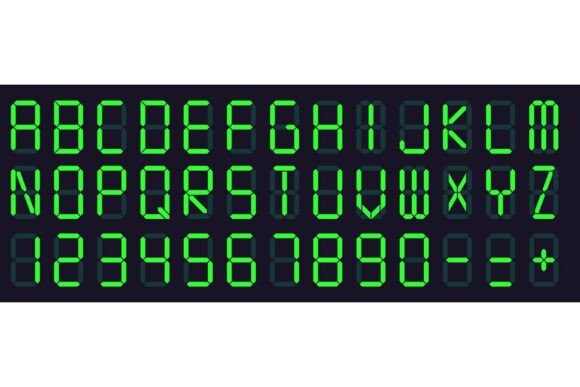
This specific category of typography mimics the seven-segment displays found on vintage calculators, microwave ovens, gym scoreboards, and bedside clocks. Unlike standard serif or sans-serif fonts, these characters are constructed from rigid geometric primitives. This constraint is exactly what gives the Digital Display Font. Alarm Clock aesthetic its unique power. It strips away decorative flourishes to focus entirely on legibility and instant recognition. In a world saturated with complex visual noise, the stark clarity of LCD monitor styling cuts through the clutter, delivering data points with mechanical authority.
Anatomy of the Electronic Alphabet
To use these fonts effectively, you must understand their structural limitations and strengths. Most alarm clock letter sets are based on a seven-segment or fourteen-segment grid. This means curves do not exist in the traditional sense; they are implied through angular connections. A lowercase 'a' might look identical to a capital 'A', or it might be stylized to fit the grid in a way that challenges readability if scaled too small.
High-quality vector sets in this genre go beyond simple numbers. While the numeric glyphs are the stars of the show, a comprehensive electronic alphabet includes punctuation, mathematical symbols, and even limited alphabetic characters that respect the segmented logic. When evaluating a font family for professional use, look for consistent stroke width and proper spacing between segments. Poorly designed versions often have segments that touch or overlap, which ruins the illusion of an illuminated screen. The best examples maintain a deliberate negative space between bars, simulating the physical gap found on actual hardware.
Retro Calculators vs. Modern Scoreboards
Not all digital fonts serve the same purpose. There is a distinct difference between the soft, rounded edges of a 1980s calculator screen and the sharp, high-contrast blocks of a modern sports scoreboard. The former evokes warmth, nostalgia, and analog computing, making it ideal for lifestyle brands, music festival posters, or apps targeting millennials and Gen X. The latter suggests real-time data, competition, and industrial utility. Before selecting a typeface, determine whether your project requires the cozy imperfection of retro tech or the sterile precision of modern LED arrays. Mixing these two sub-genres can create visual dissonance unless done with extreme intentionality.
Practical Applications Across Industries
The versatility of digital display typography extends well beyond novelty t-shirts. Professionals across various sectors leverage these fonts to solve specific communication problems.
- User Interface Design: For dashboard widgets, timer apps, and IoT device screens, these fonts reduce cognitive load. Users recognize the time or status value instantly without parsing complex letterforms.
- Marketing and Branding: Tech startups and fintech companies often use modified digital fonts to signal innovation, speed, and algorithmic precision. Conversely, fashion brands use them to tap into Y2K and cyberpunk aesthetics.
- Education and Accessibility: The simplified geometry of alarm clock numbers can be easier for young children or individuals with certain visual processing differences to distinguish compared to ornate traditional numerals.
- Environmental Graphics: Wayfinding systems, parking garage signage, and transit schedules benefit from the high legibility of segmented characters, especially when viewed from a distance or at oblique angles.
In commercial environments, the association with "real-time" information makes this typography a powerful conversion tool. A countdown timer on an e-commerce checkout page styled in a digital font feels more urgent and authentic than one set in Helvetica. It leverages decades of conditioned behavior where blinking red digits meant something required immediate attention.
Implementation Best Practices and Pitfalls
Using a Digital Display Font. Alarm Clock style requires restraint. Because these typefaces are visually heavy and highly stylized, they rarely work as body text. Attempting to set paragraphs in a seven-segment font will result in poor readability and user frustration. Reserve these fonts for headlines, data visualization, timestamps, and short labels. Pair them with clean, neutral sans-serifs like Inter, Roboto, or Arial to balance the visual weight and provide necessary context.
Color choice also plays a critical role in authenticity. While black on white is functional, adding subtle glow effects or using specific color palettes can enhance the realism. Classic amber, neon green, and bright red are the industry standards for a reason—they mimic the phosphors used in original hardware. However, avoid overusing blur filters. A slight outer glow suggests illumination; excessive blur makes the text look muddy and unprofessional. If you are working with vector sets, ensure you are using the outlined versions for print and keeping editable text layers for digital interfaces to maintain scalability.
Licensing and Commercial Viability
One often-overlooked aspect of using retro-style digital fonts is licensing. Many free downloads found online are for personal use only. If you are building a product, app, or commercial campaign, verify that the license covers your intended use case. Premium vector sets often include multiple weights, alternate characters, and commercial licenses that protect your business. Investing in a professionally crafted typeface ensures that the kerning is correct and that the font renders consistently across different operating systems and browsers, preventing layout breaks in critical digital products.
Enhancing User Experience Through Nostalgia
Beyond pure utility, there is an emotional component to digital typography. For adults aged 20 to 50, these shapes represent a bridge between the analog past and the digital present. They remind us of first video games, early programming experiences, and the tangible feel of physical gadgets. Incorporating this aesthetic into modern digital products can create a sense of familiarity and trust. It softens the coldness of glass screens by referencing a time when technology felt more tactile and understandable.
When designing for engagement, consider how the font interacts with motion. Digital fonts were born to blink, scroll, and update. Static implementations are fine, but adding subtle CSS animations or micro-interactions that mimic the refresh rate of an LCD panel can significantly boost user delight. A colon that blinks every second on a timer app isn't just decoration; it’s a heartbeat that confirms the system is alive and functioning. These small details demonstrate a level of craft that separates amateur designs from professional-grade work.
Ultimately, the decision to use an alarm clock or scoreboard font should be driven by function first and aesthetics second. Ask yourself if the segmented style improves the hierarchy of information or merely distracts from it. When applied with intention, these electronic alphabets are unmatched tools for conveying temporal data, technical precision, and retro charm. They transform abstract numbers into concrete visual signals that users process intuitively, bridging the gap between raw data and human understanding in our increasingly digital landscape.