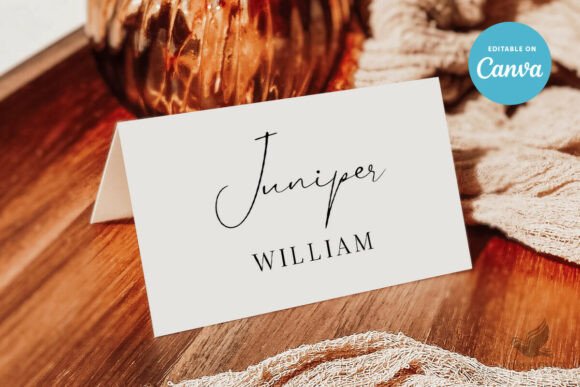
Designing Your Reception Seating with an Editable Wedding Place Card Template
The final details of wedding planning often carry the most weight, transforming a standard reception into a curated experience for your guests. Among these finishing touches, the place card serves as both a functional navigation tool and a subtle extension of your overall design aesthetic. Utilizing a digital Wedding Place Card Template allows couples to bridge the gap between professional stationery design and personal customization without the traditional costs or wait times associated with custom printing services. This specific self-edited digital template offers immediate access to a 3.5 x 2-inch layout that is fully customizable via Canva, providing a practical solution for modern wedding workflows.
The Advantages of Instant Digital Customization
Traditional stationery routes require proofs, revisions, shipping delays, and minimum order quantities that can be restrictive when guest lists fluctuate in the final weeks before the big day. A digital-first approach eliminates these friction points entirely. Because this item is a self-edited digital template, there is no physical product shipped to you. Instead, you gain instant access to a file that lives in your Canva account. This immediacy is crucial for last-minute adjustments. If a cousin confirms their attendance three days before the wedding or a table arrangement needs reshuffling hours before the ceremony, you can edit, export, and print new cards on demand.
The flexibility extends beyond simple text changes. Modern wedding styling often requires cohesion across various paper goods, from invitations to menus. With this Wedding Place Card Template, all text elements are editable. You have complete control over wording, font selection, color palettes, sizing, and placement. This level of granular control ensures that the typography on your table matches the signage at your welcome table and the headers on your dinner menu. Furthermore, the ability to upload your own images or logos means you can incorporate custom monograms, venue illustrations, or personal photography directly onto the card, creating a bespoke look that feels intentionally designed rather than generic.
Understanding Dimensions and Layout Versatility
The included template size of 3.5 x 2 inches is a standard dimension for tented place cards, making it compatible with most pre-scored cardstock available at office supply stores and specialty paper retailers. This standardized sizing simplifies the printing process significantly. However, the utility of the template goes beyond the front face. The option to add a back side transforms a simple name marker into a multi-functional piece of stationery. Creative couples often utilize the reverse side for printed menus, conversation starters, weekend itineraries, or even a thank-you note to guests. This dual-sided capability maximizes the value of the paper and reduces the need for separate printed inserts at each setting.
Background customization further enhances the adaptability of this Wedding Place Card Template. While some templates lock users into specific patterns, this version allows backgrounds to be edited for color, deleted entirely for a minimalist white look, or replaced with new textures. Whether your theme calls for moody velvet tones, airy watercolors, or clean architectural lines, the background can be adjusted to serve as the perfect canvas for your text. Artwork elements can also be resized and repositioned to accommodate longer names or different languages, though it is important to note that while artwork placement is flexible, the inherent colors of the provided artwork remain fixed to preserve the designer’s original artistic integrity.
Navigating the Editing Process and Included Resources
Transitioning to DIY stationery can feel daunting for those without graphic design experience, which is why this package includes a dedicated Canva tutorial PDF. This resource acts as a technical guide, walking users through the interface and ensuring they understand how to manipulate layers, adjust alignment, and export files correctly for print. The learning curve is minimized, allowing you to focus on creative decisions rather than software mechanics. Since there is no expiration date on the template, you can make unlimited edits over time. This is particularly beneficial for engagement parties, bridal showers, or rehearsal dinners where you might want to repurpose the same design language across multiple events leading up to the wedding.
- Text Freedom: Change every word, font, and color to match your brand.
- Image Integration: Upload personal photos or custom logos seamlessly.
- Layout Control: Move elements freely to balance visual weight.
- Unlimited Access: Return to the file as many times as needed without extra fees.
- Educational Support: Follow the included PDF tutorial for confident editing.
Critical Considerations for Home and Professional Printing
While digital templates offer immense creative freedom, the transition from screen to paper requires careful attention to technical details. Every printer interprets color data differently, meaning exact colors may vary slightly between what you see on your monitor and the final printed product. Monitors display light (RGB), while printers use ink or toner (CMYK). To mitigate this risk, it is highly recommended to print a single test copy before committing to a full batch. This allows you to verify color accuracy, check alignment for folding or cutting, and ensure the font size remains legible at physical scale.
Paper choice also plays a significant role in the final presentation. A 3.5 x 2-inch card requires sufficient weight to stand upright if used as a tent card, or enough rigidity to sit securely in a holder. Testing your chosen cardstock with the template ensures the ink does not bleed and the paper folds cleanly without cracking. Before sending any job to a professional printer or running hundreds of copies at home, thoroughly review spelling, dimensions, and layout. Digital editing makes corrections easy, but once ink hits paper, errors become costly. Taking ten minutes to proofread against your finalized seating chart can save hours of reprinting and stress.
Integrating Digital Templates into Sustainable Wedding Planning
Beyond convenience and aesthetics, using a Wedding Place Card Template supports a more sustainable and waste-conscious approach to event planning. Traditional stationery orders often include overages or become obsolete due to guest list changes, resulting in discarded paper. Digital templates allow for precise, just-in-time production. You print exactly what you need, when you need it. If a design element doesn't work after seeing the first proof, you simply adjust the file and try again without wasting dozens of pre-printed cards. This efficiency aligns with modern values of mindfulness and resourcefulness.
The workflow integration of this template also streamlines communication with vendors. By handling the design phase yourself, you retain ownership of the source file. This means you can easily share high-resolution PDFs with your florist for table mockups, your venue coordinator for setup verification, or your day-of coordinator for emergency reprints. The autonomy provided by a self-edited digital asset removes the bottleneck of waiting for a designer to respond to emails during the critical final countdown. In an industry where timelines are tight and details matter, having direct control over your Wedding Place Card Template empowers you to execute your vision with confidence, precision, and personal flair.