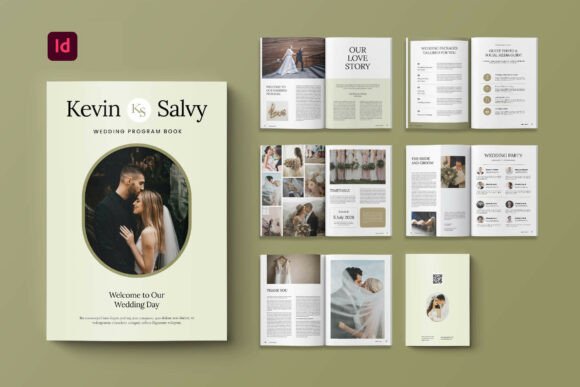
Program Book Wedding Magazine: A Versatile Design Template for Print Projects
The Program Book Wedding Magazine is a professionally designed InDesign template suited for a variety of print publications. While its name suggests a focus on weddings, this template is adaptable for use in magazines, books, catalogs, and journals. Its clean layout and structured formatting make it a practical choice for designers and content creators looking to produce polished printed materials without starting from scratch.
This template is built with functionality in mind. It comes in A4 size (21cm x 29.7cm), a standard dimension that ensures compatibility with most print services. The inclusion of 14 custom pages—covering front and back covers, title pages, and content spreads—gives users a solid framework to build upon. Each page is set to 300 DPI with a 3 mm bleed, meeting industry standards for high-quality print output.
Design Features and Technical Specifications
One of the key strengths of the Program Book Wedding Magazine is its technical preparation. The template uses CMYK color format, which is essential for accurate color reproduction in print. It also includes smart layers and neatly organized files, making it easier for users to edit and customize within Adobe InDesign.
- File Format: Adobe InDesign (editable)
- Size: A4 (21cm x 29.7cm)
- Pages: 14 total, including front/back covers
- Resolution: 300 DPI
- Bleed: 3 mm
- Fonts: Free fonts from DaFont or Google Fonts
These specifications make the template suitable for both personal and commercial use, provided users have access to Adobe InDesign or a compatible editing tool. The use of free fonts ensures accessibility without licensing complications, and the layered structure supports efficient customization.
How It Stands Out Among Print Templates
Print templates vary widely in design, flexibility, and intended use. The Program Book Wedding Magazine differentiates itself by offering a balance of visual appeal and structural clarity. Unlike minimalist or overly decorative templates, it provides a neutral yet elegant layout that can be adapted to different content types.
Many magazine and book templates focus on a specific niche—such as fashion, travel, or business—limiting their flexibility. In contrast, this template’s clean aesthetic allows it to be repurposed across different industries and formats. Whether creating a wedding program, a product catalog, or a small-run magazine, users can tailor the layout to suit their needs without extensive redesign work.
Comparing Template Options for Print Projects
When evaluating print templates, users typically consider design style, customization potential, file compatibility, and intended output. The Program Book Wedding Magazine scores well in customization and compatibility, but may not be the best fit for every scenario.
For instance, those seeking highly animated or interactive digital content may find InDesign templates limiting. Similarly, users without Adobe InDesign or design experience may prefer drag-and-drop tools like Canva or Google Docs templates, which offer simpler editing interfaces. However, for professional print production, InDesign remains a top choice due to its precision and print-ready settings.
Compared to other InDesign templates, this one offers a moderate number of pages and a well-structured layout. Some premium templates may include more page variations or advanced design elements, but they often come at a higher cost and with more restrictive licensing terms.
Strengths and Limitations
The Program Book Wedding Magazine offers several advantages:
- Professional Quality: Meets print industry standards with CMYK format, 300 DPI resolution, and bleed settings.
- Customizable Layout: Smart layers and organized files allow for easy editing and design adjustments.
- Cost-Effective: Uses free fonts and avoids restrictive licensing fees.
- Versatile Use: Can be adapted for weddings, books, magazines, and catalogs.
However, there are some limitations to consider:
- Requires Adobe InDesign: Not suitable for users who don’t have access to the software or design skills.
- Images Not Included: Preview images are for demonstration only and must be replaced with original content.
- Learning Curve: Customization may take time for those unfamiliar with InDesign’s interface.
Best Use Cases and When to Consider Alternatives
This template is ideal for individuals or small businesses looking to produce high-quality printed materials without hiring a professional designer. It works well for:
- Wedding programs and event guides
- Small-run magazines or community newsletters
- Product catalogs and portfolios
- Self-published books or journals
For users who need digital-only content, such as e-books or online magazines, other formats like PDF or ePub may be more appropriate. Additionally, those who prefer a web-based editing experience might opt for templates available in Canva, Google Docs, or Microsoft Publisher, which offer more intuitive interfaces for non-designers.
If a project requires a highly specialized layout—such as multi-language support, complex infographics, or advanced typography—users may need to invest in a custom design or a premium template package that offers extended features.
Making an Informed Choice
Selecting the right template depends on the project’s scope, the user’s technical skills, and the desired outcome. The Program Book Wedding Magazine offers a solid foundation for print projects that require a clean, organized layout with professional formatting. It strikes a balance between usability and adaptability, making it a good option for those who want to maintain design quality without excessive complexity.
Before deciding, users should consider whether they have the necessary tools and skills to work with Adobe InDesign. They should also evaluate how much customization they’ll need and whether the template’s layout aligns with their content style. If the provided structure matches the intended use and requires minimal changes, this template can save time and effort in the design process.
For those unsure about committing to a specific template, exploring a few different options—both free and paid—can provide a better sense of what works best. Comparing layouts, file formats, and customization features will help ensure the chosen template supports both current and future publishing needs.