Arcade Applique Embroidery Font a-Z: A Practical Guide to Clean Stitching and Versatile Sizing
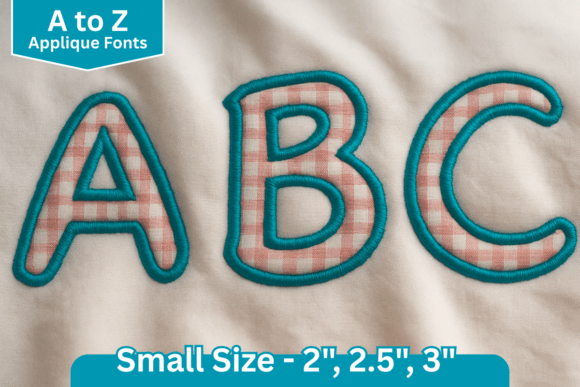
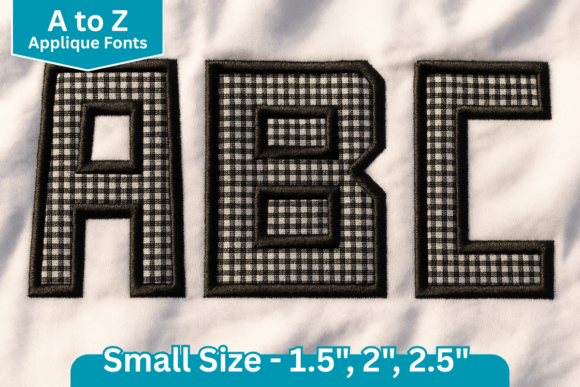
Adding a bold, handmade touch to embroidery projects often comes down to selecting the right typography. The Arcade Applique Embroidery Font a-Z is designed specifically for creators who want that distinct, textured look without the frustration of poor digitization. This set includes all capital letters from A to Z, carefully digitized to ensure clean stitching and professional results. Whether you are personalizing sportswear, creating kids’ projects, or adding monograms to bags and home décor, having a reliable appliqué alphabet is essential. However, owning the font is only the first step; understanding how to implement it correctly determines whether your final product looks polished or amateur.
Many embroiderers, from hobbyists to small business owners, assume that all appliqué fonts behave identically. This assumption frequently leads to registration issues, fabric puckering, or designs that do not fit the intended space. By addressing common oversights before you start stitching, you can maximize the versatility of this three-size collection and avoid costly material waste.
Understanding Size Limitations and Scaling Risks
One of the most frequent mistakes when using the Arcade Applique Embroidery Font a-Z is attempting to resize the designs outside of the provided parameters. This set comes in three specific sizes: 1.5″, 2″, and 2.5″. These dimensions are not arbitrary suggestions; they are engineered constraints. Appliqué relies on precise alignment between the placement line, the tack-down stitch, and the final satin border. When you arbitrarily shrink a 2.5″ letter to 1″ using machine software, the satin stitches can become too dense, causing needle breaks or thread buildup. Conversely, enlarging a 1.5″ letter to 3″ often results in gapping between the fabric edge and the border stitch, leaving raw edges exposed.
To avoid this, always select the size closest to your final requirement. If you need a 2.25″ letter, start with the 2.5″ version and scale down slightly rather than stretching the 2″ version. Respecting the digitizer’s intended size range preserves the structural integrity of the appliqué and ensures the satin stitch adequately covers the fabric edge. For projects requiring significant deviation from these three sizes, it is better to seek a different font digitized for that specific dimension than to force this set beyond its capabilities.
The Danger of Assuming Uniform Dimensions
Another critical oversight involves assuming that every letter in the alphabet shares identical width and height proportions. While the product summary provides stitch counts and dimensions for the letters “A” and “a,” this data serves only as a baseline reference. Letters like “I” and “W” have vastly different footprints despite being part of the same size category. Relying solely on the sample measurements for layout planning can lead to disastrous spacing issues, especially when stitching names or phrases where kerning matters.
Before committing to a layout, consult the full dimension details via the More Sewing Info PDF button associated with this download. This resource contains the specific measurements for all 20 letters in the set. Taking five minutes to verify the actual width of each character in your phrase prevents the common heartbreak of running out of hoop space or having a name extend off the edge of a garment. Professional results require precise planning, and accurate dimensional data is the foundation of that planning.
Fabric Selection and Stabilization Strategy
Appliqué fonts like Arcade are forgiving, but they are not immune to stabilization failures. A common error is treating appliqué the same as standard embroidery. Because appliqué adds an extra layer of fabric on top of the base material, the design carries more weight and bulk. Using a lightweight tear-away stabilizer that works fine for redwork may cause the Arcade letters to tunnel or distort during the satin stitch phase.
For sportswear and stretchy knits, use a cut-away stabilizer to provide permanent support for the added fabric layer. For woven cottons used in quilts or home décor, a medium-weight tear-away may suffice, but always test first. Additionally, consider the weight of your appliqué fabric relative to the base. Placing heavy denim on lightweight voile will cause drag and misalignment. Match your appliqué material weight to your project base whenever possible, or adjust your stabilizer strategy to compensate for the disparity. This attention to material physics prevents the "homemade" look that often stems from inadequate support.
File Format Compatibility and Transfer Integrity
This machine embroidery design comes with multiple file formats compatible with various machines, yet users still encounter readability issues. This rarely stems from the font itself and usually results from improper file transfer or corruption. Simply copying files directly to a USB drive without safe ejection, or unzipping files directly onto the stick rather than on a computer first, can corrupt the header data that tells your machine which format to read.
Always unzip the download folder on your computer first. Identify the specific format required by your machine (e.g., PES, DST, JEF) and copy only that file type to your formatted USB drive. Avoid renaming the file after transfer, as some machines rely on specific naming conventions. If your machine fails to recognize the Arcade Applique Embroidery Font a-Z, reformat your USB drive and repeat the transfer process correctly before assuming the design is defective. Maintaining digital hygiene saves hours of troubleshooting at the machine.
Maximizing Versatility Across Projects
The true value of this font lies in its adaptability across different applications. Beginners often limit themselves to standard monograms, missing opportunities to leverage the bold aesthetic for commercial or creative growth. The 1.5″ size is ideal for cuff tags, pocket logos, and baby items where space is limited. The 2″ size serves as a versatile middle ground for tote bags, pillowcases, and youth apparel. The 2.5″ size makes a statement on jacket backs, adult sweatshirts, and large wall hangings.
When evaluating this purchase, consider your upcoming project queue. If you primarily work on infant clothing, the 2.5″ size may see little use, but if you run a custom apparel business, having all three sizes allows you to offer tiered pricing based on design complexity and size. Understanding your specific workflow helps justify the investment and guides you toward utilizing the font efficiently rather than letting unused sizes sit dormant in your library.
Final Checks Before Stitching
Success with the Arcade Applique Embroidery Font a-Z requires a proactive approach. Before starting any new project, perform a test stitch-out on scrap fabric that matches your final project's weight and texture. Verify that the placement line is visible enough to guide your fabric positioning accurately. Ensure your scissors are sharp enough to trim close to the tack-down stitch without fraying. Confirm that your hoop tension is correct to prevent shifting during the multi-step appliqué process.
By respecting the engineered sizes, consulting full dimension charts, matching stabilization to fabric weight, and handling digital files with care, you transform this font from a simple download into a reliable production tool. The goal is consistent, high-quality output that reflects well on your craftsmanship, whether you are stitching for profit or pleasure. Thoughtful preparation eliminates the variables that lead to failure, allowing the clean digitization of this alphabet to shine through in every finished piece.