Revitalizing Modern Design with Retro Groovy Letters Canva Frame Assets
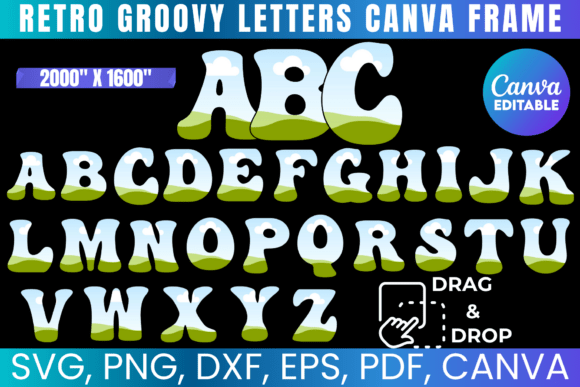
The resurgence of 70s-inspired typography has taken the creative world by storm, but achieving that authentic, bubbly aesthetic often requires advanced illustration skills or expensive software. This is where the Retro Groovy Letters Canva Frame collection bridges the gap between nostalgic style and modern accessibility. Unlike standard fonts that offer fixed shapes and colors, these editable frames function as dynamic containers. They allow designers to drag and drop textures, photographs, gradients, or solid colors directly into the letterforms, transforming static text into a vibrant focal point for any project.
For creators working within the Canva ecosystem, this toolset represents a significant workflow upgrade. The ability to make your own groovy letters without leaving the browser-based platform means less time toggling between programs and more time refining the visual message. Whether you are designing a vintage-style concert poster, a trendy t-shirt graphic, or social media assets, these frames provide the structural integrity of retro typography with the limitless customization potential of digital design.
Beyond Static Fonts: The Power of Editable Frames
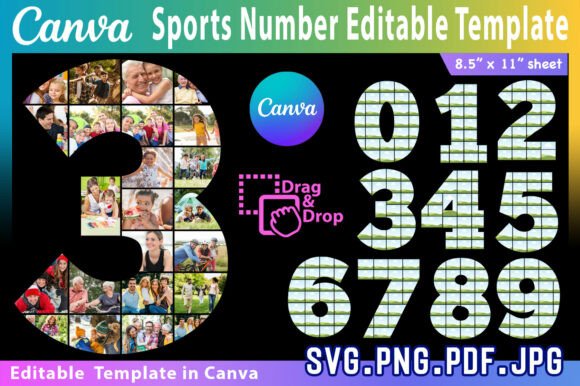
Understanding the distinction between a font and a frame is crucial for maximizing this asset's potential. A traditional editable font in Canva restricts you to color changes and basic effects like shadows or outlines. In contrast, the Retro Groovy Letters Canva Frame acts as a mask. When you upload a floral pattern, a grainy film texture, or a neon gradient, the frame clips that image precisely to the curves of the alphabet. This capability unlocks a level of depth and complexity that standard typography simply cannot achieve.
This functionality is particularly valuable for branding projects where consistency meets variety. You can maintain the same groovy typeface across a campaign while altering the internal fill to match different seasonal themes or product lines. For example, a summer sale might feature letters filled with tropical sunset hues, while a winter promotion uses the exact same letter shapes filled with cozy knit textures. The drag-and-drop nature of Canva designs makes this iteration process instantaneous, encouraging experimentation rather than rigid adherence to a single look.
Cross-Platform Compatibility for Makers and Printers
While the Canva integration is a headline feature, professional designers and crafters rarely work in a single silo. A robust digital asset must travel seamlessly between different environments. This collection addresses that need by including versatile file formats alongside the Canva link. The inclusion of SVG files ensures compatibility with Cricut and Silhouette Studio, making these letters ideal for vinyl cutting and physical crafts. Meanwhile, DXF files cater specifically to Silhouette users who require precise cut lines, and high-resolution PNGs with transparent backgrounds serve those working in Adobe Photoshop or other raster-based software.
This multi-format approach supports a hybrid workflow. A designer might conceptualize and mock up a t-shirt design using the Editable Font Canva frames for speed and ease, then export the finalized SVG to send to a production facility or cut personally on a vinyl plotter. Having PDF files with solid white backgrounds also provides a reliable fallback for print shops that prefer vector-based documents or for users creating sublimation transfers where color accuracy and edge definition are paramount.
Practical Applications Across Creative Industries
The versatility of these alphabet frames extends far beyond simple decoration. Their bold, rounded geometry commands attention, making them exceptionally well-suited for specific commercial and personal applications.
- Apparel and Merchandise: The thick strokes of groovy lettering provide ample surface area for intricate fills, ensuring readability even when printed on fabric. This makes them perfect for statement tees, tote bags, and embroidered patches.
- Event Stationery: Wedding invitations, birthday cards, and festival tickets benefit from the warm, inviting tone of retro typography. Customizing the letter fills to match event color palettes creates a cohesive guest experience.
- Social Media Content: In an era of fleeting attention spans, unique typography stops the scroll. Using textured frames for headlines or quotes adds tactile interest to flat digital screens.
- Sublimation Projects: Because the frames accept full-color imagery, they are ideal for sublimation printing on tumblers, keychains, and phone cases where vibrant, all-over color is desired.
Each of these use cases leverages the core strength of the asset: the fusion of structured form and organic content. The letters provide the legibility and style, while the user-provided fills inject personality and relevance.
Navigating Technical Considerations and Best Practices
To get the most out of the Retro Groovy Letters Canva Frame set, users should be mindful of a few technical nuances. While Canva is renowned for its user-friendly interface, achieving professional results requires some intentionality. When dragging images into frames, pay attention to resolution. Low-quality source images will appear pixelated when stretched across large letterforms, especially if the final output is intended for print. Always opt for high-DPI textures and photos to maintain crisp edges and smooth gradients.
For Cricut and Silhouette users, it is important to note that template dimensions may occasionally require manual adjustment. Digital design software and cutting machine software sometimes interpret sizing differently. Utilizing the included measurement guides ensures that what you see on screen translates accurately to the physical medium. Additionally, while the Canva link offers incredible flexibility, basic knowledge of your chosen software remains essential. Understanding layer management, grouping, and export settings will prevent frustration and streamline the creation process.
The Value of Digital Flexibility in Modern Workflows
In today’s fast-paced creative landscape, efficiency does not have to come at the cost of originality. The Make Your Own Groovy Letters capability empowers creators to produce bespoke typography without the steep learning curve of hand-lettering or vector illustration. This democratization of design allows small business owners, teachers, parents, and professional designers alike to access high-end aesthetics previously reserved for specialists.
Furthermore, because this is a digital product, it eliminates the logistical friction associated with physical supplies. There is no shipping wait time, no inventory to manage, and no material waste during the prototyping phase. You can test fifty different color combinations in the time it would take to mix a single batch of paint. This immediacy encourages a more playful, iterative approach to design where mistakes are easily undone and happy accidents are quickly capitalized upon.
When selecting assets for your library, prioritize tools that offer both stylistic appeal and functional adaptability. The combination of editable Canva frames with industry-standard vector and raster files ensures that your investment serves you across multiple platforms and projects. Whether you are crafting a one-off gift or establishing a comprehensive brand identity, these retro groovy letters provide a flexible foundation that grows with your creative needs. By mastering the interplay between the frame structure and your custom content, you transform a simple alphabet into a powerful engine for visual storytelling.