To Do List Pages & Daily to Do List Organizer Kit
Staying organized in a digital-first world requires more than just a blank sheet of paper or a generic notes app. Effective time management hinges on having the right visual structure to support your specific workflow. This is where specialized To Do List Pages and a structured Daily to Do List system become indispensable assets for modern professionals and creators. Rather than reinventing the wheel every time you need to plan a sprint, track expenses, or organize content, leveraging a comprehensive organizer toolkit allows you to bypass the design phase and move straight to execution.
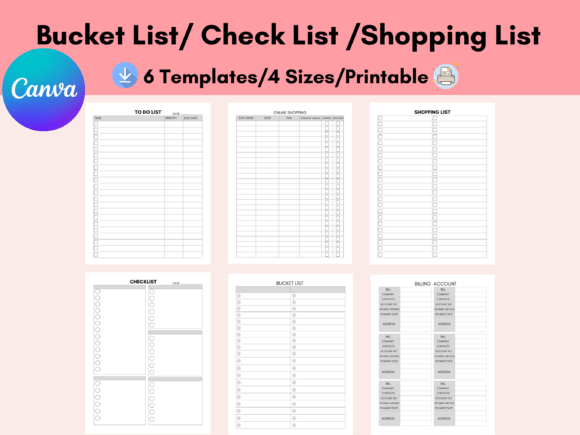
This particular toolkit is engineered to be a central hub for both personal productivity and commercial digital product creation. It moves beyond simple task tracking to encompass a holistic view of your responsibilities, including bucket lists, shopping trackers, billing guides, and detailed checklists. For entrepreneurs selling on platforms like Etsy, Shopify, or Amazon KDP, these aren't just planning tools; they are ready-to-sell digital assets that can generate passive income with minimal additional effort.
Versatility Across Personal and Professional Spheres
The true strength of this organizer bundle lies in its adaptability. A standard daily planner might work for scheduling meetings, but it often fails when you need to track inventory for an e-commerce store or manage client billing cycles. This toolkit addresses those gaps by providing distinct templates for varied use cases.
- Content Creators and Bloggers: Use the checklist templates to streamline editorial workflows, ensuring SEO optimization, image formatting, and social media promotion steps are never missed before publishing.
- Finance and Business Coaches: The billing account guide and expense trackers serve as excellent lead magnets or value-add resources for clients learning to manage their own business finances.
- Etsy and Shopify Sellers: The online shopping tracker and inventory checklists help manage supply chains, while the editable nature of the files allows you to rebrand and resell them as your own digital products.
- Personal Productivity Enthusiasts: From grocery lists to lifelong bucket lists, the variety ensures that every aspect of life organization is covered in a cohesive visual style.
By integrating these diverse elements into one ecosystem, users reduce the cognitive load associated with switching between different apps and notebooks. Everything exists within a unified design language, which enhances focus and reduces friction in daily routines.
Streamlined Customization with Canva Integration
One of the most significant barriers to using high-quality organizational tools is the inability to customize them without advanced graphic design skills. This toolkit eliminates that hurdle through seamless Canva integration. Whether you are using the free version or Canva Pro, the editing process is intuitive and accessible.
You do not need to be a designer to make these templates your own. The pre-designed layouts act as a professional foundation, allowing you to focus entirely on branding. Within minutes, you can upload your unique logo, adjust the color palette to match your website or brand identity, and swap out fonts and icons to reflect your personal aesthetic. This level of customization is crucial for coaches and creators who need their resources to look polished and authoritative. Instead of spending hours aligning text boxes and choosing complementary colors, you simply log in, tweak the existing elements, and export a print-ready or web-optimized file.
For those considering resale, this feature is particularly valuable. You can create multiple variations of the same Daily to Do List template by changing color schemes and typography, effectively multiplying your product catalog from a single source file. This scalability is essential for building a sustainable digital product business on marketplaces like Gumroad or Amazon KDP.
Technical Specifications and Format Flexibility
Practicality extends beyond aesthetics to physical and digital usability. This bundle acknowledges that organization happens in various environments, from home offices to coffee shops and corporate boardrooms. To accommodate this, the toolkit includes four distinct Checklist PDFs available in both Letter Size (8.5 x 11) and A4 formats.
This dual-format approach ensures global compatibility. Users in North America can print seamlessly on standard letter paper, while international users can utilize A4 without awkward scaling or margin issues. Furthermore, because the source files are editable in Canva, resizing for other dimensions—such as A5 planners or digital tablet sizes like GoodNotes—is straightforward. This flexibility makes the toolkit future-proof, adapting to whatever device or medium you prefer for managing your tasks.
Enhancing User Experience Through Visual Hierarchy
Effective To Do List Pages are not merely about listing items; they are about guiding attention. Poorly designed lists can actually increase anxiety by presenting tasks as an undifferentiated wall of text. This toolkit utilizes proven design principles to enhance user experience and productivity.
Clear visual hierarchy distinguishes high-priority tasks from low-priority ones. Dedicated sections for notes, deadlines, and categorization prevent mental clutter. When used commercially, this attention to detail translates directly to customer satisfaction. Buyers of digital planners are increasingly sophisticated; they expect functional layouts that genuinely aid productivity rather than just looking pretty. By starting with professionally structured templates, you ensure that the end product delivers real utility, leading to better reviews and repeat customers.
Strategic Implementation for Digital Entrepreneurs
If your goal is to sell these organizers, treat the customization process as a strategic branding exercise. Don't just change the colors; adapt the language and categories to fit a specific niche. A "Daily to Do List" for a new mom looks very different from one designed for a software project manager, even if the underlying layout is identical.
- Identify Your Niche: Before opening Canva, define exactly who will use this list. Specificity sells better than generality.
- Brand Consistency: Ensure your customized templates match your existing website, social media, and email marketing visuals. Cohesion builds trust.
- Test Functionality: Print a copy or use it digitally for a week before listing it for sale. Verify that the writing space is adequate and the flow makes sense in real-world application.
- Create Mockups: Use Canva’s smart mockup features to showcase your customized lists in realistic settings. Customers need to visualize how the product fits into their lives.
For personal users, the implementation strategy should focus on habit formation. Choose one or two templates from the kit to start rather than overwhelming yourself with all options at once. Perhaps begin with the Daily to Do List for morning planning and the Shopping List for weekend errands. As these habits solidify, gradually introduce the Billing Guide or Bucket List templates. The toolkit is designed to grow with you, offering structure when you need it and staying out of the way when you don't.
Ultimately, whether you are organizing your own life or building a product line for others, the value of this Comprehensive Organizer Toolkit lies in its balance of structure and freedom. It provides the professional framework necessary for efficiency while leaving ample room for individual expression and specific functional needs. In an era where digital products and personal productivity intersect, having a reliable, editable, and aesthetically pleasing set of To Do List Pages is a practical investment in both sanity and success.